AI thumbnail generator
Describe the thumbnail for your video: the person, the big words, the colors. Pick 16:9 and make one on this page.
Make yours with Recraft V4.1 Flash
$0.0024 per imageThe form opens on a low-priced model that fits. Every model in the list below opens the same form on its own page.
Settings
About $0.0024 Before it starts you see the most it can cost. If it fails, you pay nothing.
The same request as the settings on the left, ready to copy.
curl https://api.martllm.com/v1/images/generations \
  -H "Authorization: Bearer $UBERLLM_API_KEY" \
  -H "Content-Type: application/json" \
  -d '{
  "model": "recraft/recraft-v4-1-flash",
  "prompt": "",
  "resolution": "1k",
  "n": 1
}'

# → {"created": …, "data": [{"url": "https://api.martllm.com/v1/media/artifacts/<id>/0"}]}

# Download it
curl -L -o image.png -H "Authorization: Bearer $UBERLLM_API_KEY" "https://api.martllm.com/v1/media/artifacts/<id>/0"
Examples to start from
Each one loads a prompt and its settings into the form above. Change anything, then run it.
01
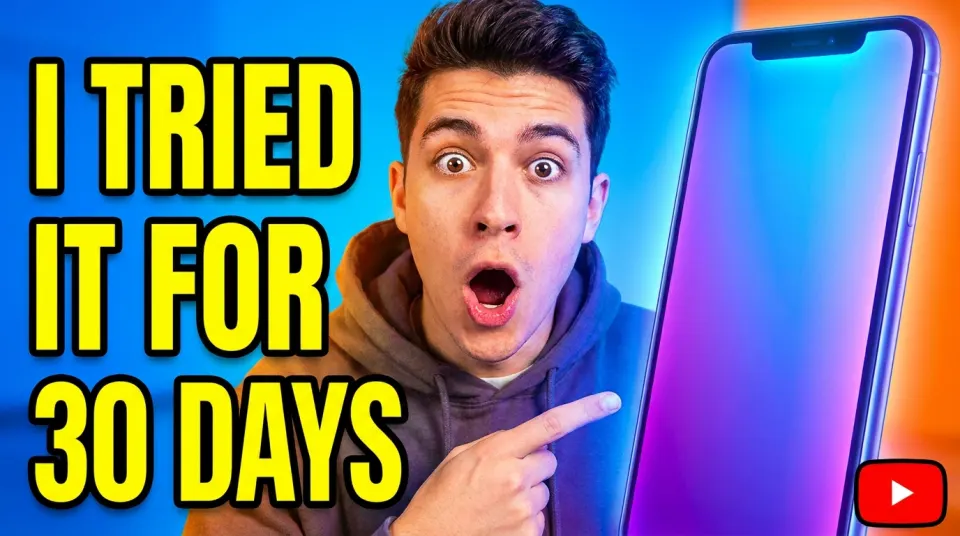
Challenge video
A YouTube video thumbnail: a surprised young man pointing at a giant glowing smartphone on the right, bold yellow text "I TRIED IT FOR 30 DAYS" with a black outline on the left, bright saturated colors, high contrast, clean background
Prompt only
02
Cooking video
A YouTube video thumbnail: a close-up of a perfect cheeseburger with melting cheese on the left, bold white text "10 MINUTE BURGER" with a red outline on the right, dark background, high contrast
Prompt only
03
Travel video
A YouTube video thumbnail: a hiker on a cliff edge above a turquoise lake, bold white text "HIDDEN LAKE" at the top left, a red arrow pointing at the lake, vivid colors
Prompt only
Made on MartLLM
How to do it
- Sign up and add credit. One key works with every model on MartLLM.
- Describe the scene and the expression, and write the big words inside quotation marks. Fewer words read better.
- Pick 16:9 where the model offers it.
- Press Generate, read the most it can cost, and start it.
- Read the words, then download it. Picture links stop working after a short time, so save it right away.
Models that can do this
Every model in this list makes a picture from a prompt alone, in 16:9 where the model offers shapes.
| Model | Price now | Resolution | Shape |
|---|---|---|---|
| Recraft V4.1 Flash | $0.0024 per image | 1k | 1:1 |
| FLUX.1 [schnell] | $0.0029 per image | ||
| Image 01 Image To Image | $0.0033 per image | 1k | |
| MiniMax Image-01 | $0.0033 per image | 1k | 1:1, 4:3, 3:4, 3:2, 2:3, 16:9, 9:16 |
| Z-Image Turbo (Venice) | $0.0045 per image | ||
| FLUX.1 Dev Ultra Fast | $0.0048 per image | 1k | 1:1, 4:3, 3:4, 3:2, 2:3, 16:9, 9:16 |
| P-Image | $0.0048 per image | 1k | 1:1, 16:9, 9:16, 4:3, 3:4, 3:2, 2:3 |
| Muse Image | $0.0049 per image | 1:1, 3:2, 16:9, 21:9, 9:16, 2:3, 3:4 |
Questions
How much does it cost?
You pay per result, at the price shown next to each model on this page. Prices are live and come from the sellers on MartLLM, with no MartLLM fee on a request. There is no monthly fee: add credit from $5 and pay as you go. Before a run starts you see the most it can cost.
Will the words in the picture be spelled right?
Not always: models differ at writing text. Put the exact words in quotation marks in the prompt and read the result before you use it. A finished picture is billed even if a word is wrong.
Can I put my own face on it?
This page makes a thumbnail from words. To start from your own photo, use the AI image editor page: upload the photo and describe the thumbnail.
What if it fails or I do not like the result?
A run that fails, is canceled or does not finish in time costs nothing. A run that finishes is billed, even if you do not like what it made, so start with a short, low-priced setting.
More to make
- Text to video generator
- Image to video generator
- AI video generator with sound
- First and last frame video generator
- Reference to video generator
- AI video upscaler
- Product video generator
- AI image generator
- AI image editor
- AI background changer
- AI product photo generator
- AI headshot generator
- AI style transfer
- AI poster generator
- AI music generator
- AI sound effect generator
- AI 3D figurine generator
- AI outfit changer
- AI hairstyle changer
- AI photo restoration
- AI interior design generator
- AI pet portrait generator
- AI object remover
- AI mockup generator
- AI ad image generator
- AI logo generator
- AI sticker generator
- AI t-shirt design generator
- AI coloring page generator
- AI UGC video generator
- Animate old photos
- Logo animation generator
- AI voice generator