Animate old photos
Upload an old photo and describe a small, natural movement. The photo is the first frame of the clip.
Make yours with Muse Video
$0.0024 / secThe form opens on a low-priced model that fits. Every model in the list below opens the same form on its own page.
Settings
Start picture (optional)
About $0.0119 Before it starts you see the most it can cost. If it fails, you pay nothing.
The same request as the settings on the left, ready to copy.
curl https://api.martllm.com/v1/video/generations \
  -H "Authorization: Bearer $UBERLLM_API_KEY" \
  -H "Content-Type: application/json" \
  -d '{
  "model": "meta-llama/muse-video",
  "prompt": "",
  "resolution": "720p",
  "duration_seconds": 5,
  "aspect_ratio": "16:9"
}'

# → {"id": "<job id>", "status": "queued", "poll_url": "/v1/video/generations/<job id>"}
Examples to start from
Each one loads a prompt and its settings into the form above. Change anything, then run it.
01
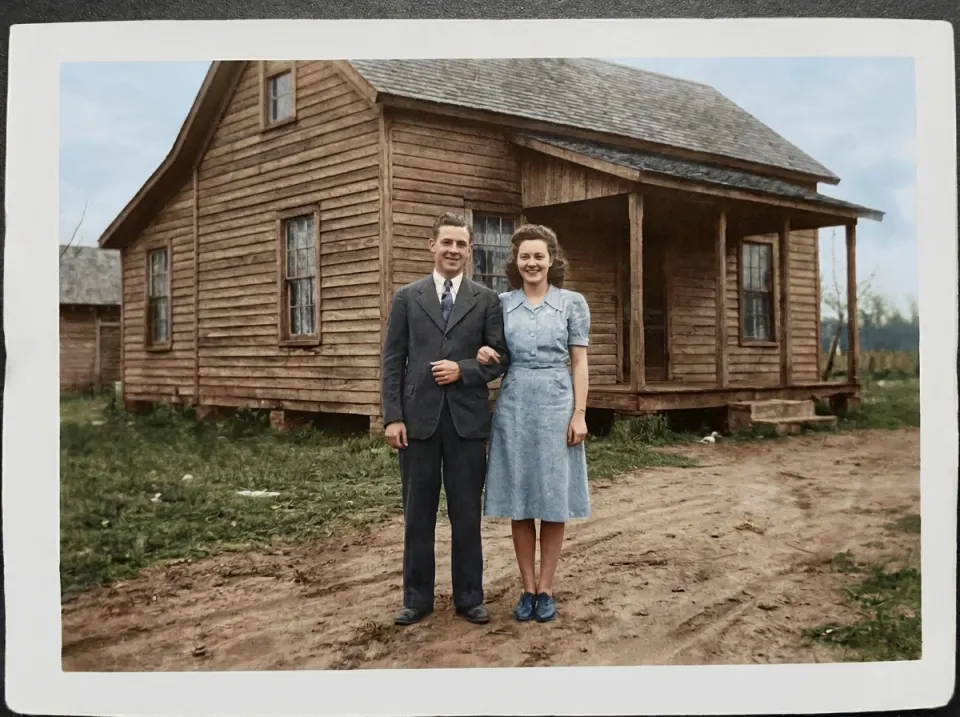
A couple smiles
The people in the photo smile, turn their heads to each other and laugh softly, a light breeze moves their clothes and the grass, the camera stays still
With your picture · 5 s
02
A portrait comes alive
The person in the portrait blinks, smiles slightly and turns their head a little toward the camera, natural and calm, the camera stays still
With your picture · 5 s
Made on MartLLM
How to do it
- Sign up and add credit. One key works with every model on MartLLM.
- Add the photo as the start picture. A cleaned-up photo works best: the AI photo restoration page fixes scratches and adds color first.
- Describe a small movement (a smile, a glance, a breeze) and say that the camera stays still.
- Pick the length and press Generate. Read the most it can cost, and start it.
- A video usually takes one to three minutes. Download it when it is done: video files are kept for about 3 hours.
Models that can do this
Every model in this list takes a start picture and uses it as the first frame, so the clip begins on your photo.
| Model | Price now | Length | Resolution | Shape | Sound | Pictures |
|---|---|---|---|---|---|---|
| Muse Video | $0.0024 / sec | 2 to 10 s | 720p | 16:9, 9:16, 1:1, 4:3, 3:4, 3:2, 2:3 | ✓ | 1 |
| Vidu Q2 Turbo (image-to-video) | $0.0133 / sec | 1 to 10 s | 720p, 540p, 1080p | Up to 2 | ||
| Grok Imagine Video 1.5 | $0.0134 / sec | 1 to 15 s | 480p, 720p | ✓ | 1 | |
| Vidu Q2 Pro Fast (image-to-video) | $0.0152 / sec | 1 to 8 s | 720p, 1080p | Up to 2 | ||
| PixVerse V6 | $0.0162 / sec | 1 to 15 s | 720p, 360p, 540p, 1080p | 16:9, 4:3, 1:1, 3:4, 9:16, 2:3, 3:2, 21:9 | ✓ | 1 |
| Pruna P-Video (image-to-video) | $0.019 / sec | 1 to 20 s | 720p, 1080p | ✓ | 1 | |
| PixVerse V6 Max | $0.0216 / sec | 1 to 15 s | 720p, 360p, 540p, 1080p | 16:9, 4:3, 1:1, 3:4, 9:16, 2:3, 3:2, 21:9 | ✓ | 1 |
| PixVerse V6 Transition | $0.0238 / sec | 1 to 15 s | 720p, 360p, 540p, 1080p | ✓ | Up to 2 |
Questions
How much does it cost?
You pay per result, at the price shown next to each model on this page. Prices are live and come from the sellers on MartLLM, with no MartLLM fee on a request. There is no monthly fee: add credit from $5 and pay as you go. Before a run starts you see the most it can cost.
Is the movement real?
No. The model makes up how the people move from one still photo. Keep the movement small for a natural result, and say so if you share it.
Which picture files can I use?
A PNG, JPG or WebP picture under 10 MB from your computer, or a public https:// link to one.
What if it fails or I do not like the result?
A run that fails, is canceled or does not finish in time costs nothing. A run that finishes is billed, even if you do not like what it made, so start with a short, low-priced setting.
More to make
- Text to video generator
- Image to video generator
- AI video generator with sound
- First and last frame video generator
- Reference to video generator
- AI video upscaler
- Product video generator
- AI image generator
- AI image editor
- AI background changer
- AI product photo generator
- AI headshot generator
- AI style transfer
- AI poster generator
- AI music generator
- AI sound effect generator
- AI 3D figurine generator
- AI outfit changer
- AI hairstyle changer
- AI photo restoration
- AI interior design generator
- AI pet portrait generator
- AI object remover
- AI mockup generator
- AI ad image generator
- AI logo generator
- AI sticker generator
- AI thumbnail generator
- AI t-shirt design generator
- AI coloring page generator
- AI UGC video generator
- Logo animation generator
- AI voice generator